AdGuard VPN
Screenshots

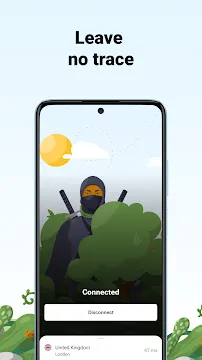

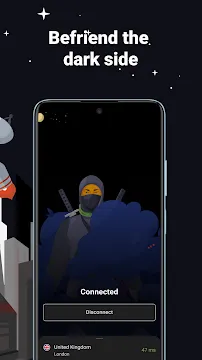
AdGuard VPN offers complete digital privacy and anonymous browsing for modern mobile users. Active online protection hides your personal IP address from untrusted third parties. As a result, you gain uninterrupted access to public networks without exposing sensitive data.
In addition, this mobile application encrypts your web traffic using a unique, stealthy protocol. You can easily bypass local network restrictions and access global content from anywhere. Consequently, users enjoy total web freedom while keeping their private identity safe.
Comprehensive Privacy Protection with AdGuard VPN
AdGuard VPN shields your online activity from invasive trackers and watchful data brokers. Therefore, your browsing history remains strictly confidential across every active session. The system strictly follows a zero-logs policy to protect user information.
For example, public Wi-Fi networks often expose your device to serious cyber threats. However, using this encrypted tunnel prevents unauthorized access to your private files. So, you can safely log into sensitive accounts anywhere.
- Mask your true location instantly on any network.
- Block unwanted data collection from aggressive trackers.
- Keep your personal identity hidden from public view.
Advanced Security Protocols in AdGuard VPN
Custom encryption protocols set this system apart from standard connection tools. Most traditional VPN connections get flagged easily by strict network firewalls. That is to say, standard secure traffic looks obvious to network monitors.
On the other hand, AdGuard VPN disguises your traffic as normal web traffic. As a result, restrictive firewalls cannot detect or block your active session. Consequently, you maintain stable connection speeds without dropping your line.
- Hide encryption signatures from local network inspection tools.
- Maintain fast download speeds on restricted network nodes.
- Eliminate speed drops caused by network throttling.
Global Server Network and Fast Connection Speeds in AdGuard VPN
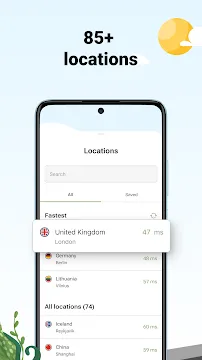
High-speed servers operate across dozens of strategic global locations worldwide. Users can choose distant locations with a simple tap on the screen. Above all, these locations offer unlimited bandwidth for heavy video playback.
Furthermore, the quick-connect option selects the fastest available server automatically. Response times stay low during active gaming and live streaming. Therefore, you enjoy smooth media playback without annoying buffering screens.
- Select from dozens of fast global locations instantly.
- Enjoy unlimited data usage on high-speed remote servers.
- Automatically connect to the nearest low-latency node.
Key Features of AdGuard VPN App For Android
Powerful built-in tools allow users to personalize their mobile privacy settings. You can adjust encryption modes based on your daily online routine. In addition, clean control menus make feature toggling quick and simple.
Moreover, these security options work quietly in the mobile background. You enjoy continuous protection without battery drain or performance delays. To clarify, advanced settings offer total control over your encrypted traffic.
Proprietary Protocol
A unique custom protocol masks encrypted data as standard web traffic. Consequently, network inspectors cannot detect that you are using a secure tunnel. This technology keeps your mobile connection fast and completely private.
Furthermore, this stealth protocol bypasses deep packet inspection systems easily. It operates smoothly even on networks that normally block standard security tools. Therefore, your connection stays reliable in restrictive network environments.
Selective Split Tunneling
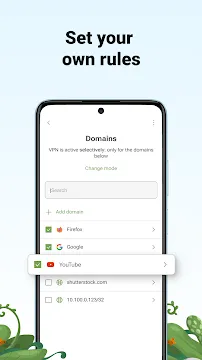
Selective mode gives you exact control over which apps use the tunnel. For instance, you can route banking apps through regular local networks. Meanwhile, streaming applications run through secure nodes for maximum location choices.
In addition, this feature prevents unnecessary encryption on trusted applications. You save mobile data and maintain fast speed for daily tools. Consequently, your phone operates efficiently without extra processing overhead.
Strict No-Logs Policy
Privacy remains completely guaranteed because no user activity records are created. The developer team never logs visited websites or download records. As a result, your digital footprint vanishes completely upon disconnection.
Moreover, independent audits confirm the strict privacy standards of this system. No personal information is stored on remote servers at any time. Therefore, your online session details stay entirely between you and your device.
Custom DNS Protection
Built-in DNS protection blocks malicious domains and aggressive tracking scripts. Users can choose secure DNS providers directly inside the settings menu. Thus, you prevent unwanted advertisement requests before they reach your screen.
In addition, custom DNS options shield your mobile device from phishing attempts. You can enable family-friendly filters to block adult content automatically. Consequently, your browsing environment stays clean, fast, and safe.
Integrated Kill Switch
An automated kill switch stops internet access if the connection drops suddenly. That is to say, unencrypted data never leaks onto public networks. Your true IP address stays hidden during unexpected signal interruptions.
For example, moving between cell towers can cause temporary connection drops. The kill switch holds back data transmission until the secure link recovers. So, your personal details never expose themselves during network handoffs.
Custom Exclusions List
You can add specific web domains directly into custom exclusion lists. The system automatically turns off encryption whenever you visit those listed domains. Likewise, other websites stay fully encrypted without manual adjustment.
Furthermore, exclusion rules apply smoothly in both general and selective modes. You manage domain lists effortlessly through a clean visual menu. Therefore, you enjoy personalized web routing tailored to your browsing needs.
AdGuard VPN: Smart App Management and Custom Exclusions
Managing application traffic requires zero technical experience or setup effort. The clear menu lists every installed app on your mobile device. So, you simply flip switches to include or exclude specific programs.
In addition, this flexible system saves mobile bandwidth on essential applications. Navigation maps and ride services work normally without location errors. Meanwhile, private web browsers keep total encryption for confidential search tasks.
- Select specific applications for secure encrypted routing.
- Prevent location errors on local service apps.
- Lower battery consumption by bypassing harmless applications.
AdGuard VPN: Seamless Integration with Popular Ad Blocking Tools
Running multiple security tools usually creates system conflicts on mobile devices. However, this application works in total harmony with dedicated ad blockers. An integrated proxy mode lets both programs operate at the same time.
Consequently, you get full ad filtering together with encrypted data routing. This combined setup cleans up web pages and secures personal data simultaneously. In short, your mobile privacy becomes twice as effective.
- Combine ad filtering with secure encryption effortlessly.
- Eliminate background conflicts between mobile security tools.
- Experience faster loading web pages with fewer online distractions.
How to Download and Install AdGuard VPN APK
Getting the official installation package takes only a few quick steps. Follow this simple guide to secure your mobile device in minutes:
- Click the download button on our trusted page to get the installer package.
- Open device settings and enable installations from unknown sources.
- Locate the saved package inside your mobile file manager.
- Tap the file to begin the automatic setup process.
- Launch the app, sign in, and activate your private tunnel.
AdGuard VPN: Effective Mobile Security Tips and Tricks
- Enable auto-connect when joining untrusted public wireless networks.
- Use exclusion lists for local banking tools to avoid security flags.
- Select custom DNS servers to block unwanted ads across all apps.
- Pick server nodes near your physical region for optimal connection speeds.
- Turn on the kill switch to stop accidental data exposure during drops.
- Combine this app with ad blockers using the integrated proxy mode.
Conclusion
In conclusion, mobile privacy requires powerful tools built for fast, secure browsing. This protection application hides your identity while opening access to online content. Custom encryption protocols keep your private data safe from tracking networks.
To sum up, smart app management and custom DNS options give you full digital control. You can browse safely on any network without sacrificing connection speed. Download the installation package today to experience complete online freedom and privacy.